Find The Problem
Restore The Clarity
PDLC Smart Film Troubleshooting Guide
Bullconcept PDLC Smart Film systems are designed to provide reliable, long-term operation when correctly installed, connected and maintained. As with any electrically controlled glazing system, however, operational issues may occasionally occur as a result of power supply problems, damaged or loose connections, control-system faults, environmental conditions or physical damage.
This troubleshooting guide is designed to help identify common symptoms, determine their possible causes and guide you through the appropriate diagnostic steps.
Some basic checks can be performed safely by the user, while electrical measurements, wiring inspections and repairs should only be carried out by a qualified electrician or competent technician.
Important: If you are unsure about any troubleshooting procedure, or if the installation shows signs of electrical damage, overheating, moisture ingress or damaged wiring, disconnect the system from the mains supply immediately and contact Bullconcept Technical Support.
Before You Begin
Before troubleshooting the system, first identify what is actually happening and whether the problem affects the complete installation, an individual glass panel, or only part of a Smart Film panel.
Where possible, check whether the problem occurs with all available control methods. For example, if a remote control does not operate the film but the wall switch functions normally, the Smart Film and its power supply are unlikely to be the source of the problem.
It is also important to identify the type of Smart Film installed. Most conventional PDLC Smart Film products are opaque when switched OFF and transparent when switched ON. Reverse PDLC (PNLC) operates in the opposite way and is transparent when OFF and opaque when ON. Etched or electrically segmented Smart Film may additionally contain independently controlled areas.
Understanding the System
A typical PDLC Smart Film installation consists of several components working together:
Mains Power → Control Device → PDLC Power Supply / Transformer → Smart Film Wiring & Busbars → PDLC Smart Film
A fault at any point in this chain can prevent the Smart Film from operating correctly.
For example, a panel remaining opaque does not automatically mean that the Smart Film itself has failed. The cause may instead be a disconnected mains supply, defective switch or relay, faulty transformer, loose cable connection, damaged wiring or interrupted electrical connection to the film.
For this reason, troubleshooting should always begin with the simplest and least invasive checks before progressing to electrical measurements or inspection of the Smart Film connections.
Safety First
PDLC Smart Film operates using a dedicated AC power supply. Although the film itself typically operates at approximately 60 V AC, the power supply may be connected directly to 230 V AC mains electricity.
Checks involving exposed mains wiring, transformer input connections, electrical distribution equipment or internal electrical components must therefore only be performed by a qualified electrician or competent technician.
Always isolate the electrical supply before inspecting wiring, connections, busbars or other electrical components.
✓ USER CHECK
Simple checks that do not require opening electrical equipment or accessing exposed wiring.
Smart Film does not switch / remains opaque
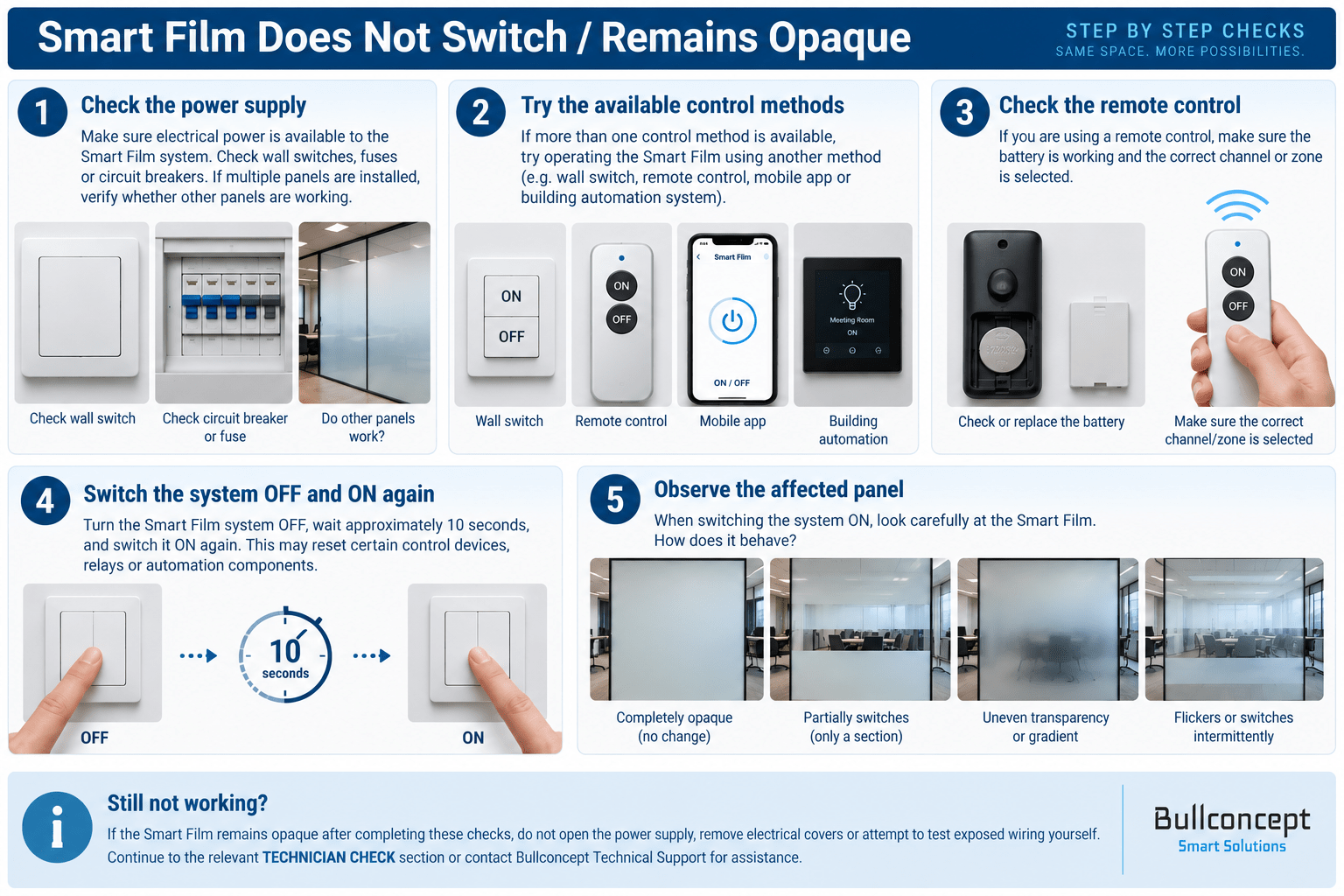
If your PDLC Smart Film remains opaque when switched ON, the problem may not necessarily be with the Smart Film itself. It may be related to the electrical supply, control method, remote control or an individual panel connection.
Where multiple Smart Film panels or control methods are available, check whether other panels operate normally and try an alternative control method. This can help determine whether the issue affects the complete system or only a particular panel, zone or control device.
Observe the affected Smart Film while attempting to switch it ON. Note whether it remains completely opaque, partially changes state, appears uneven or flickers, as these observations can help identify the possible cause.
Do not open the power supply, remove electrical covers or attempt to test exposed wiring yourself. Follow the visual troubleshooting procedure below.
Smart Film remains transparent
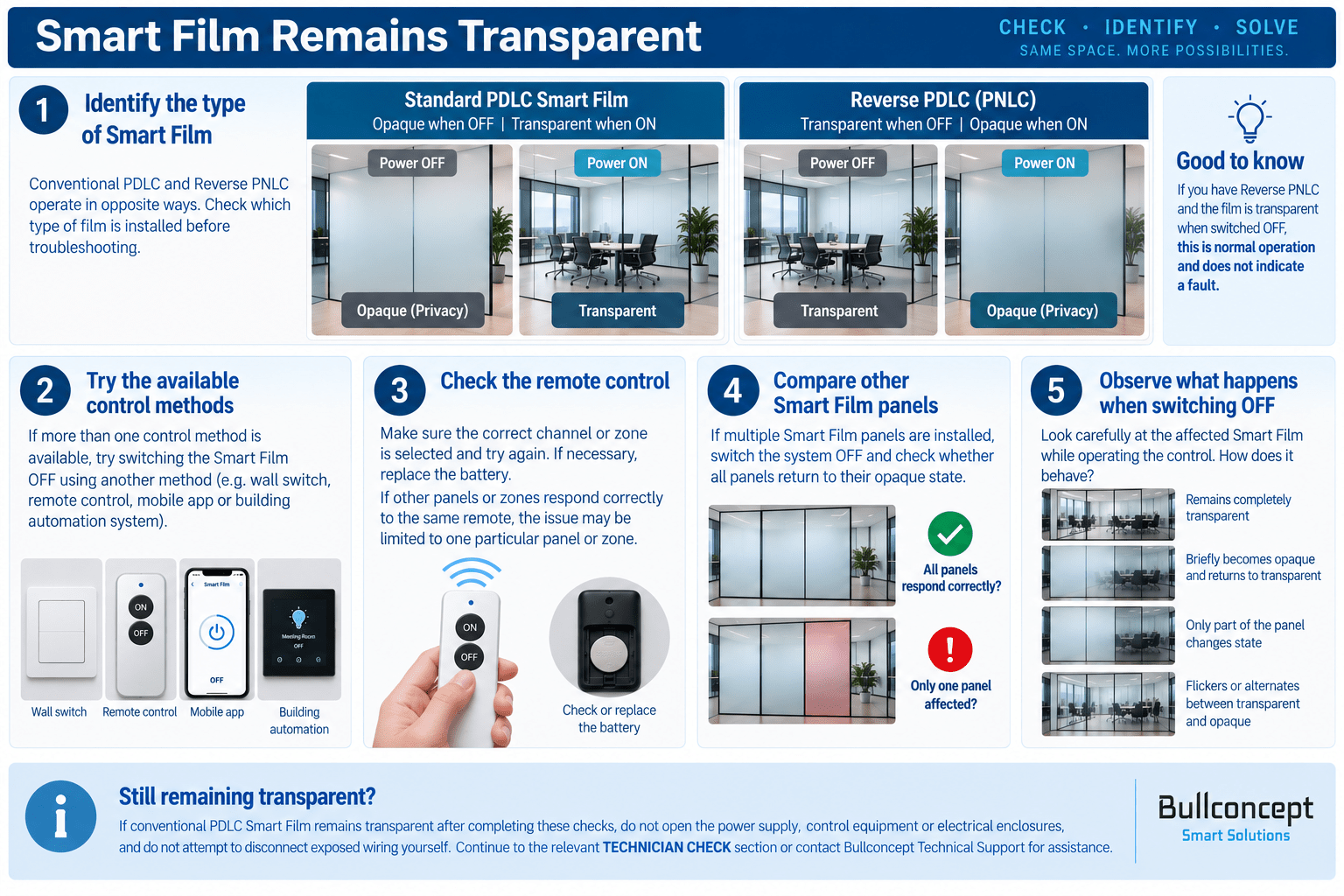
If your Smart Film remains transparent when you expect it to return to its opaque privacy state, first confirm which type of Smart Film is installed. Conventional PDLC and Reverse PNLC operate in opposite ways: Standard PDLC is opaque when powered OFF and transparent when ON, while Reverse PNLC is transparent when OFF and opaque when ON.
If conventional PDLC remains transparent after being switched OFF, try another available control method and compare the behaviour of other Smart Film panels or zones where available. This can help determine whether the issue affects the complete system or only a particular control, panel or zone.
Observe the affected Smart Film while switching it OFF and note whether it remains completely transparent, briefly becomes opaque, changes only partially or flickers between states. These observations can help identify the possible cause.
Do not open the power supply, control equipment or electrical enclosures, and do not attempt to disconnect exposed wiring yourself. Follow the visual troubleshooting procedure below.
Remote control does not operate the Smart Film
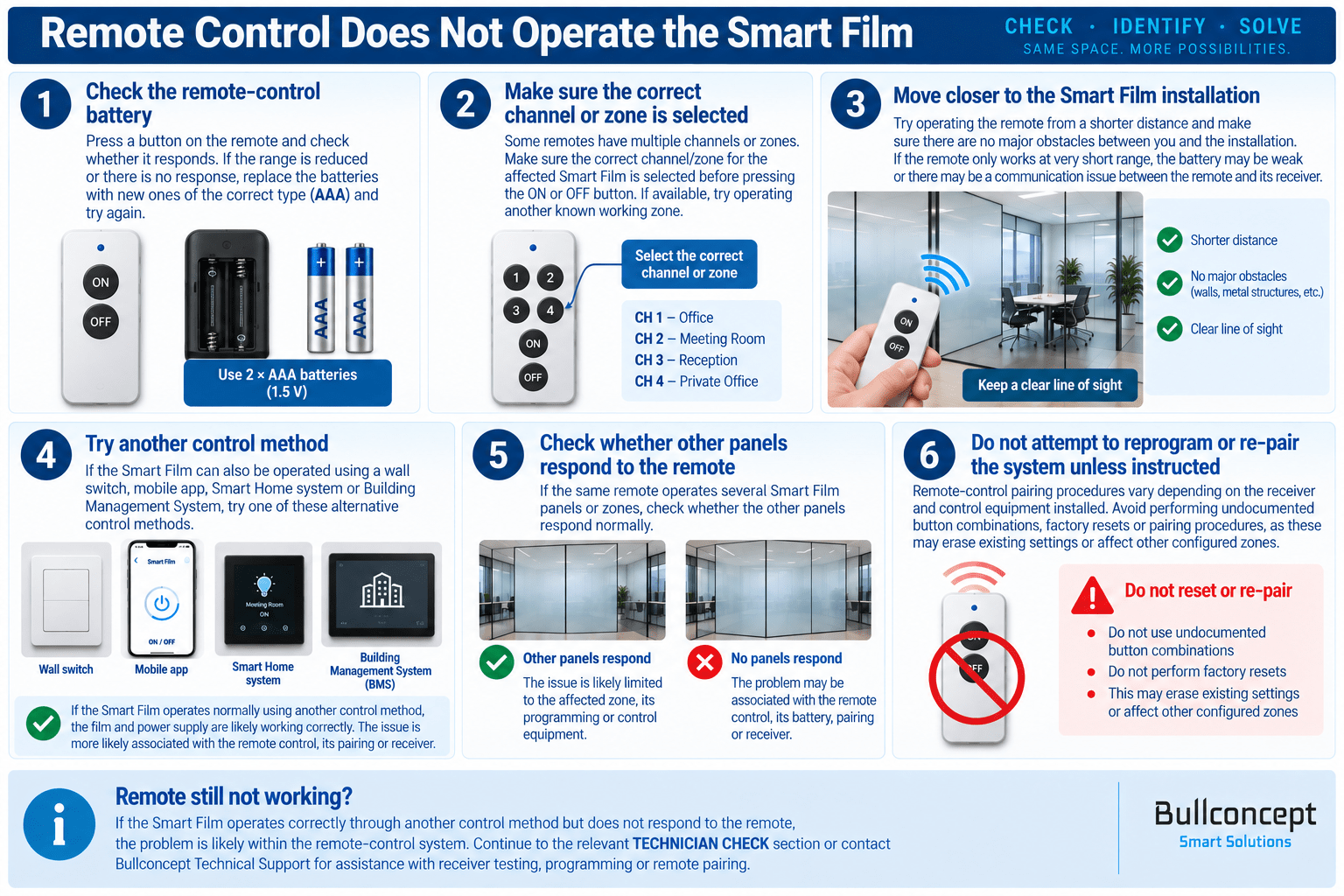
If the Smart Film does not respond when using the remote control, the problem may be limited to the remote-control system rather than the Smart Film itself. Common causes include weak or depleted AAA batteries, an incorrect channel or zone selection, communication range, or an issue with the remote receiver.
Where another control method is available, such as a wall switch, mobile application, Smart Home system or BMS, use it to operate the affected Smart Film. If the film responds normally, the Smart Film and its power supply are likely functioning correctly and the issue is more likely associated with the remote-control system.
If the same remote operates multiple panels or zones, check whether the problem affects all of them or only one particular zone. This information can help distinguish a remote or receiver issue from a problem associated with an individual control zone.
Do not perform undocumented pairing procedures, factory resets or receiver programming, as this may erase existing settings or affect other configured zones. Follow the visual troubleshooting procedure below.
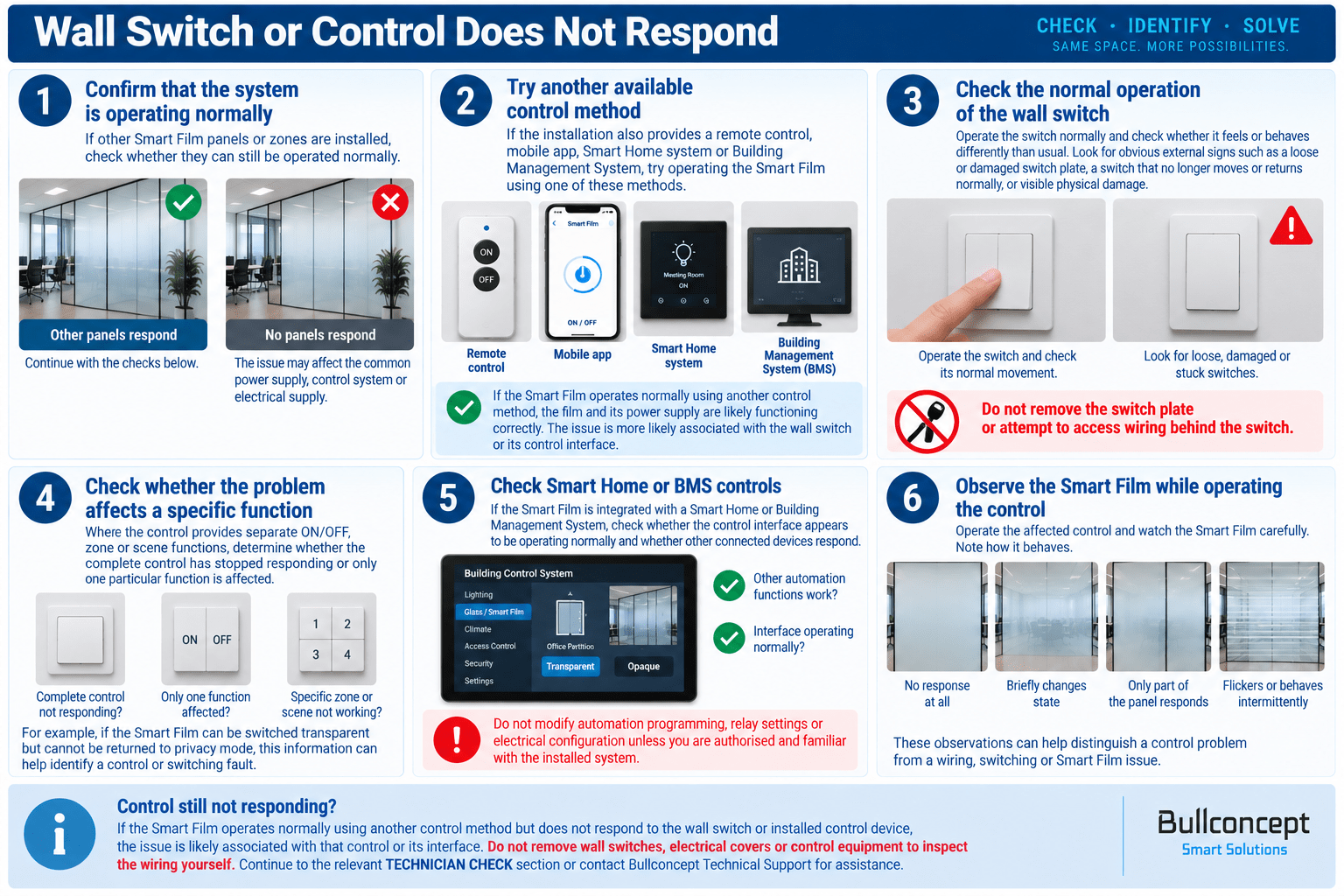
Wall switch or control does not respond
If the Smart Film does not respond when using a wall switch or installed control device, first determine whether the problem affects only that control method or the complete Smart Film system.
Where another control method is available, such as a remote control, mobile application, Smart Home system or BMS, use it to operate the affected Smart Film. If the film responds normally, the Smart Film and its power supply are likely functioning correctly and the issue is more likely associated with the wall switch, control input or associated control equipment.
Check only for obvious external signs of damage or abnormal operation. If the installation uses multiple panels or zones, note whether the problem affects one particular area or the entire system, as this can help identify the possible cause.
Do not remove wall switches, electrical covers or control equipment to inspect the wiring yourself. Follow the visual troubleshooting procedure below.
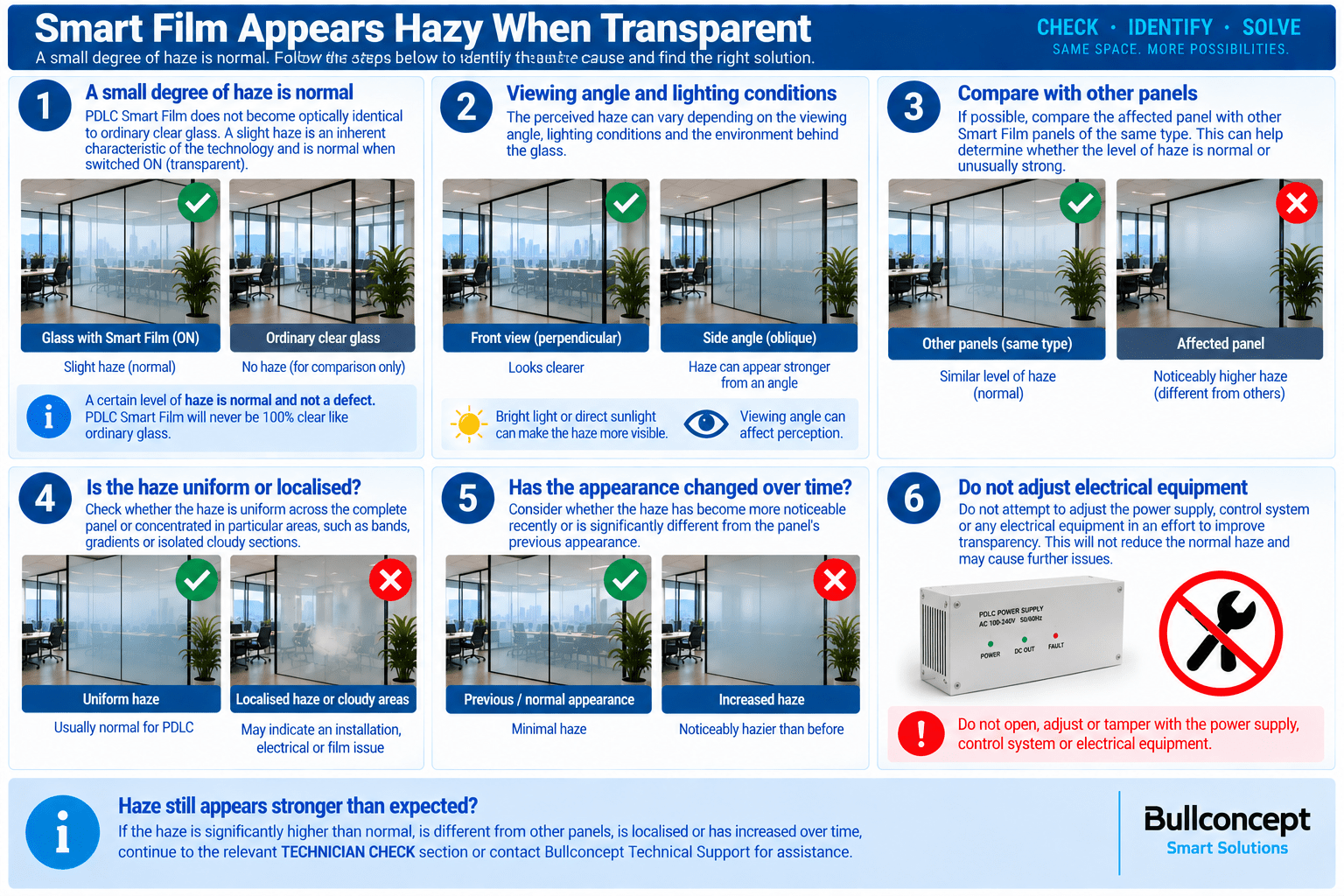
Smart Film appears hazy when transparent
PDLC Smart Film does not become optically identical to ordinary clear glass when switched ON. A small degree of visible haze is a normal characteristic of PDLC technology and may become more noticeable depending on viewing angle, lighting conditions and the environment behind the glass.
If the haze appears significantly stronger than usual, compare the affected panel with other Smart Film panels of the same type where available. Also observe whether the haze is uniform across the complete panel or concentrated in particular areas, such as bands, gradients or isolated cloudy sections.
A noticeable change from the panel’s previous appearance, particularly when only one panel is affected, may indicate an electrical, installation or Smart Film issue rather than normal PDLC haze.
Do not attempt to adjust the power supply or electrical system to improve transparency. Follow the visual troubleshooting procedure below.
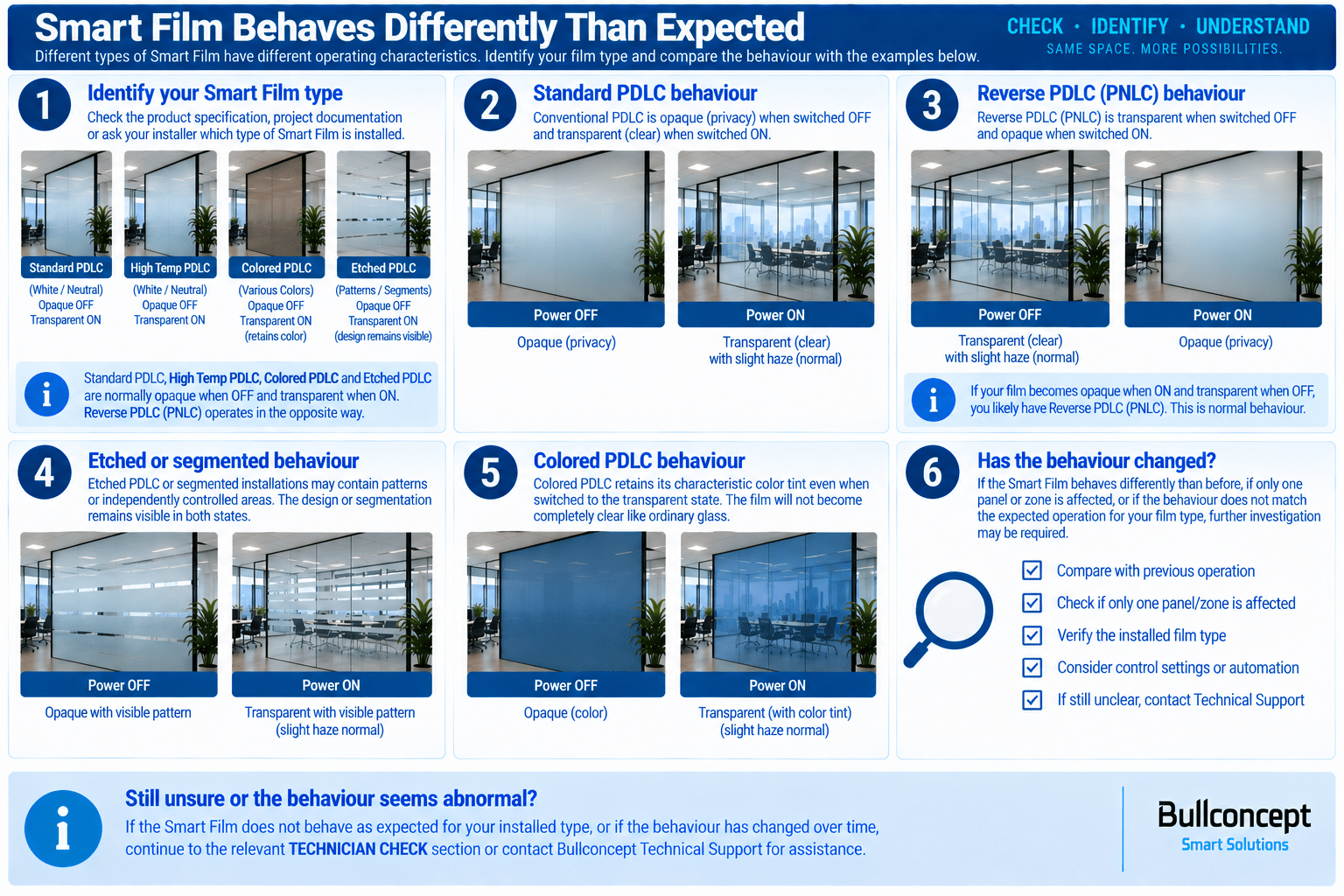
Smart Film behaves differently than expected
Different types of Smart Film do not necessarily operate in the same way. Before assuming there is a fault, confirm which Smart Film product is installed and what its normal operating behaviour should be.
Standard PDLC, High Temperature PDLC, Colored PDLC and conventional Etched PDLC are normally opaque when powered OFF and transparent when powered ON. Reverse PDLC (PNLC) operates in the opposite way and is transparent when OFF and opaque when ON.
Etched or segmented Smart Film installations may also contain independently controlled areas, allowing selected sections or patterns to switch separately from the surrounding film. Colored Smart Film retains its characteristic color tint even when switched to its transparent state.
If the behaviour has changed from how the installation previously operated, affects only one panel or zone, or cannot be explained by the installed Smart Film type or configured control functions, further investigation may be required.
Follow the visual guide below to compare the observed behaviour with the expected operation of your Smart Film.
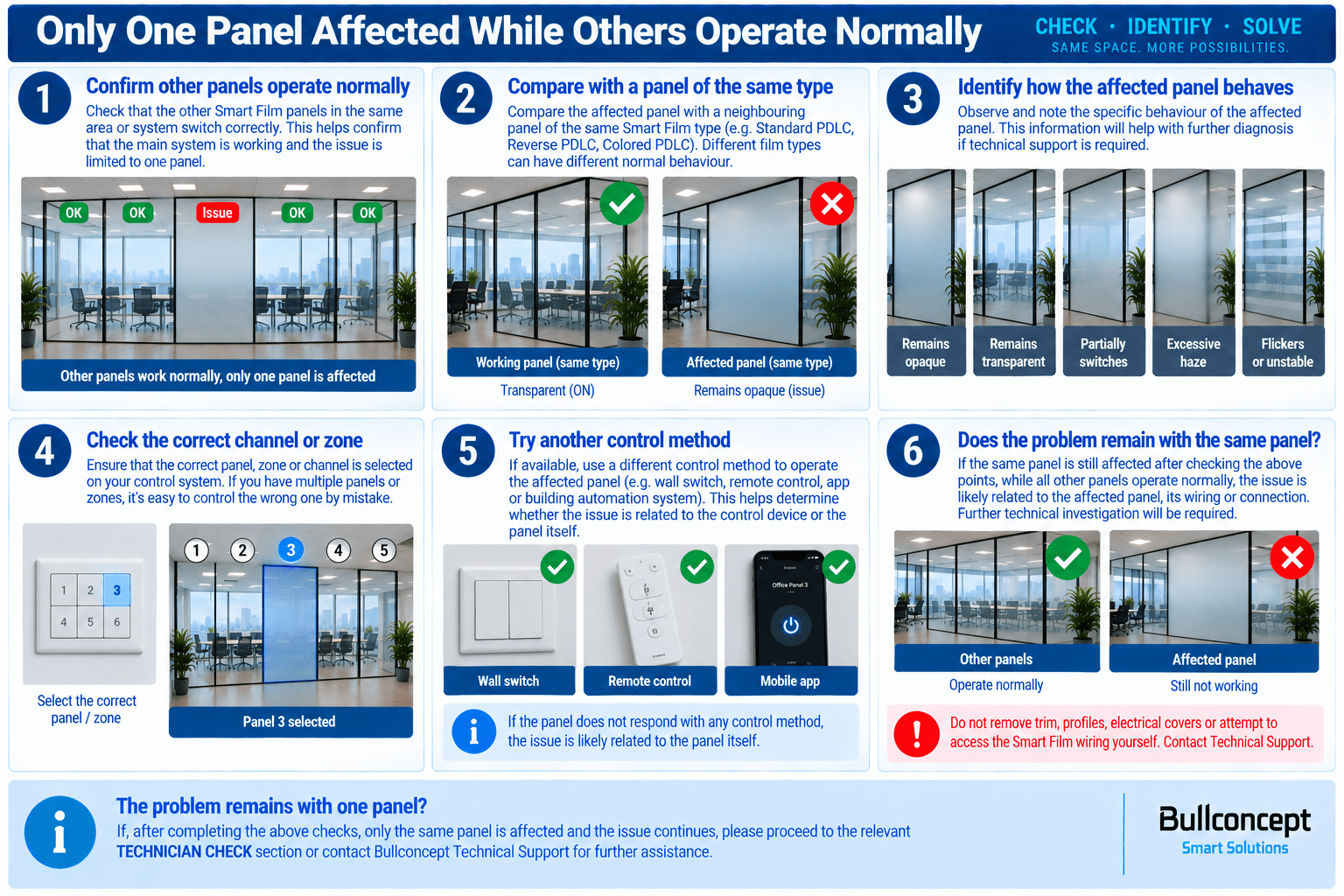
Only one panel affected while others operate normally
If several Smart Film panels are installed and only one panel behaves differently while the others operate normally, this generally indicates that the main system is functioning and that the issue is limited to the affected panel, its individual control zone or its electrical connection.
Compare the affected panel with a neighbouring panel of the same Smart Film type. Observe whether it remains opaque or transparent, switches only partially, appears unusually hazy, flickers, or responds differently when the same control command is used.
Where panels are controlled individually, confirm that the correct zone or channel is selected and, if another control method is available, use it to operate the affected panel. If the problem remains limited to the same panel regardless of the control method used, further technical investigation may be required.
Do not remove trim, profiles, electrical covers or attempt to access the Smart Film wiring or busbar connections yourself. Follow the visual troubleshooting procedure below.
🔧 TECHNICIAN CHECK
Diagnostic procedures involving electrical measurements, wiring, transformers, busbars or control equipment.
Smart Film does not switch despite power being available
Only part of the Smart Film switches
Uneven or gradient transparency
Smart Film flickers or switches intermittently
Transformer / power supply does not provide output
One or more panels operate differently from the others
Control system operates but the Smart Film does not respond
Suspected damaged wiring or busbar connection
⚠ STOP & CONTACT SUPPORT
Conditions where continued operation or troubleshooting could cause further damage or present an electrical safety concern.
Burning smell, smoke or signs of overheating
Transformer or electrical components become unusually hot
Visible sparks, arcing or electrical short circuit
Water or moisture has reached electrical connections
Smart Film or wiring shows visible electrical damage
Film is physically damaged, torn or severely creased
Busbar or electrical connection appears damaged
Problem persists after completing the applicable troubleshooting steps
If you have any further inquiries or need personalized assistance, feel free to contact us — we’re here to help!